
|
TimeKeepR is a module that allows the entry and tracking of planned and actual times on elements other than project tasks, while maintaining a consistent entry logic with the Dolibarr standard.
This module extends the native time management capabilities to the following elements:
- Work order
- Ticket
- Native work order
- Factory
- Equipment
The goal is to enable consistent recording of planned and actual time in order to provide a consolidated monthly view of time.
|
Usage & Features
Time Entry Tab
On each compatible device, the module adds a dedicated tab allowing:
- Entry of planned times
- Entry of actual times
- On-the-fly time entry
- Viewing of the history of entered times
The interface follows the standard Dolibarr logic for immediate usability.
Enter a planned time
- Open the relevant item (intervention, ticket, etc.)
- Click on the TimeKeepr tab
- Fill in the fields:
- Planned date
- Planned duration
- User involved
- Comment (optional)
- Confirm with the Add button
|
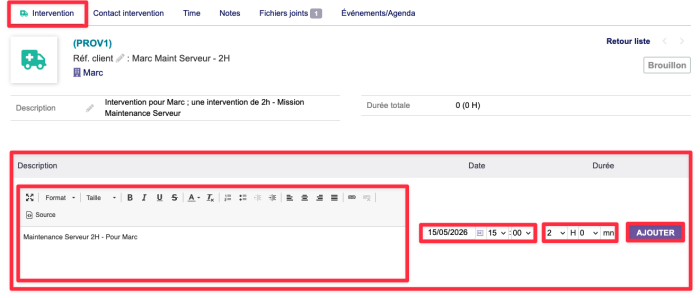
You must create an intervention or other record at the base of the form; otherwise, adding it via the "Time" sub-tab will not be possible.
|
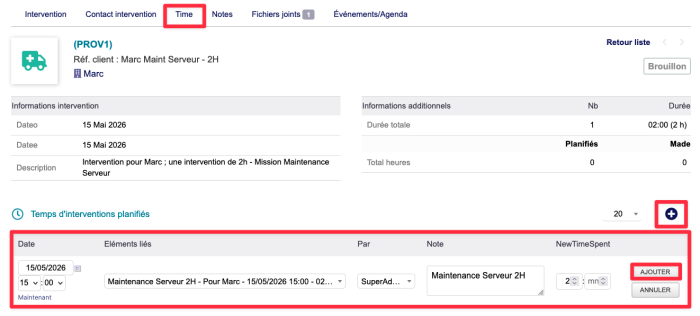
|
In this tab you will need to fill in the following fields:
- Date & Scheduled Time
- Item Affected
- Completed By...
- Note (optional)
- Estimated Completion Time
|
Enter Time Tendered
- From the TimeKeepr tab of the item
- Fill in the fields:
- Date completed
- Time taken
- User who performed the task
- Comment (optional)
- Confirm with the Add button
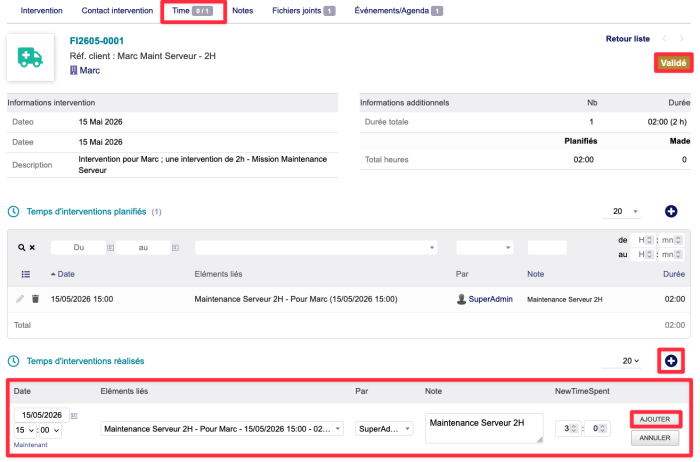
|
In this tab you will need to fill in the following fields:
- Date & Time completed
- Item affected
- Completed By...
- Rating (optional)
- Time taken
|
|
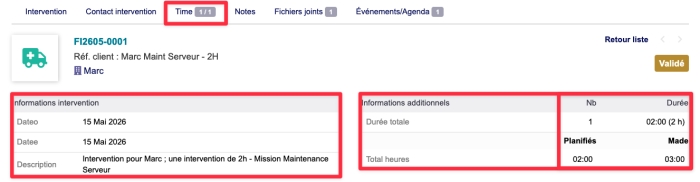
The top of the page will allow you to view the record data, including the completion time and the planned time.
|
On-the-fly time entry
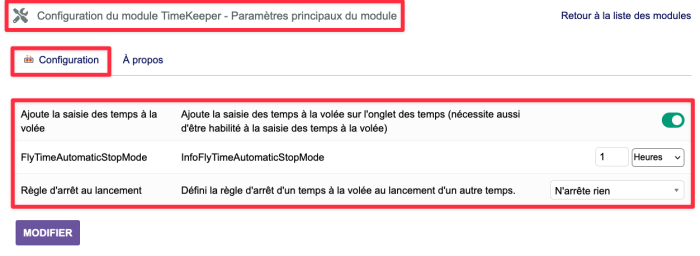
On-the-fly time entry allows you to add elapsed time directly to the current time.
This added time is defined directly in the TimeKeepr plugin settings.
|
If the function is enabled, it is possible to define the addition in:
|
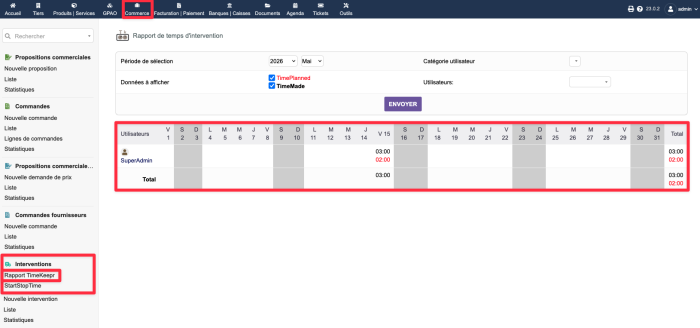
In each left-hand menu associated with an item, a new "TimeKeepr Report" menu is added, providing access to a comprehensive view of time spent over a month:
- Display of scheduled time
- Display of actual time spent
- Filtering by item type (interventions, tickets, etc.)
- View over a monthly period
|
The TimeKeepr report tab displays a table showing the planned and actual times over a month, as well as the differences between the two.
You can also filter the data by period type (month, week, day, etc.), categorize users, or use it directly.
|
Cette vue facilite :
- Le pilotage de l'activité
- L'analyse des écarts planifié / réalisé
- Le suivi de la charge de travail
Éléments compatibles
| Élément |
Onglet de saisie |
Rapport mensuel |
Saisie des temps à la volée
|
| Fiche d'intervention |
✅ |
✅ |
✅
|
| Ticket |
✅ |
✅ |
⛔
|
| Ordre de Fabrication natif |
✅ |
✅ |
✅
|
| Factory (plugin) |
✅ |
✅ |
✅
|
| Equipement (plugin) |
✅ |
✅ |
✅
|


