De Documentations Patas-monkey
Aller à la navigation
Aller à la recherche
| Third-Party Space
|
Third-Party Details
|
Elements present in a Third-Party Details screen
|
- Third-Party Search Box
- Quarterly Table of New Third-Parties
- Selection Button by Customer, Prospect, or Supplier
- Monthly Chart of New Third-Parties
- Top Customers
- Selection Button by the Entire Period, Year, or Current Quarter
- Latest Updated Customers
- Outstanding Customers
|
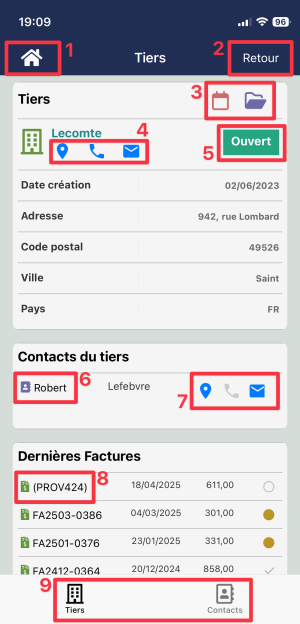
|
- 1: Return to the Dolismart home page
- 2: Return to the previous page
- 3: Popup corresponding to the item tabs (here, calendar and attached documents)
- 4: Tier contact information (address; telephone number; email address accessible from the smartphone)
- 5: Item status
- 6: Table of items associated with the item (here, the Third Party's contacts)
- 7: Tier contact/address
- 8: Invoice associated with the Tier
- 9: Navigation to other menu items
As mentioned previously, the details screen adapts based on the user's access rights. Each user only sees the modules and information they are authorized to access.
|
