|
|
| Ligne 1 : |
Ligne 1 : |
| A button is available in the 'To be collected' and 'To be reserved' sections to allow direct collection of the required number of products. | | A button is available in the '''To be collected''' and '''To be reserved''' sections to allow direct collection of the required number of products. |
| {| class="wikitable" | | {| class="wikitable" |
| |- style="horizontal-align:center" | | |- style="horizontal-align:center" |
Dernière version du 1 octobre 2025 à 17:14
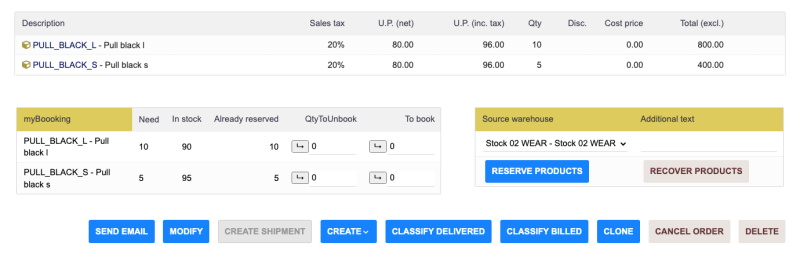
A button is available in the To be collected and To be reserved sections to allow direct collection of the required number of products.
|
|
| You can see that there is a change in the quantities to be reserved and those already reserved.
|
The second section allows you to confirm the reservation:
- If there are multiple warehouses defined, a drop-down list is displayed with the default warehouse selected.
- You can enter a text message that will be associated with the reservation stock movement.
- Finally, a button allows you to confirm the reservation.
|
