|
|
| (16 versions intermédiaires par le même utilisateur non affichées) |
| Ligne 1 : |
Ligne 1 : |
| <languages/> | | <languages/> |
| <div lang="fr" dir="ltr" class="mw-content-ltr">
| | {| class="wikitable" |
| {| class="wikitable" | | |- style="vertical-align:top;" |
| |- style="vertical-align:top;" | |
| | [[File:Activity-250x250.png]] | | | [[File:Activity-250x250.png]] |
| | Le module activity ajoute des widgets dans les pages d'accueil de Dolibarr. | | | The activity module adds widgets to Dolibarr's home pages. |
| Vous pouvez choisir vous-même sur quel page d'accueil de dolibarr (home, tiers, comptabilité, ...)
| | You can choose which Dolibarr home page (home, third parties, accounting, etc.) to display on. |
| |} | | |} |
| </div>
| |
|
| |
|
| <div lang="fr" dir="ltr" class="mw-content-ltr"> | | <span id="Paramétrage"></span> |
| == Paramétrage == | | == Settings == |
| </div>
| |
|
| |
|
| <div lang="fr" dir="ltr" class="mw-content-ltr">
| |
| {| class="wikitable" | | {| class="wikitable" |
| | [[file:activity-Configuration.png|600px]] | | | [[file:activity-Configuration_en.png|600px]] |
| | style="vertical-align:top;" | | | | style="vertical-align:top;" | |
| La configuration du module s'effectue depuis la page d'administration des modules accessible par les menus '''Accueil > Configuration > Modules''' en cliquant sur l'icône [[file:doli-setup.png]] ou [[file:doli-setup-old.png]] en bout de ligne.
| | Module configuration is performed from the module administration page, accessible via the "Home > Configuration > Modules" menu by clicking on the [[file:doli-setup.png]] or [[file:doli-setup-old.png]] icon at the bottom of the line. |
| </div>
| |
|
| |
|
| <div lang="fr" dir="ltr" class="mw-content-ltr">
| | * The number of billing years allows you to define the number of lines to display in certain tables. Be careful, if you enter a large number, this may impact your display performance. |
| * Le nombre d'année de facturation permet de définir le nombre de lignes à afficher sur certains tableaux, attention, si vous mettez un grand nombre, cela peu impacter vos performances d'affichage. | | * It is possible to define the display of the invoice amount (excluding or including tax). |
| * il est possible de définir l'affichage du montant des facture (HT ou TTC) | | * If you do not select a specific bank, the collection will be totaled across all banks (which can double certain amounts in the case of transfers between bank accounts). |
| * Si on ne sélectionne pas une banque en particulier l'encaissement sera totalisé sur toute les banques (ce qui peux doubler certains montant en cas de virement entre compte bancaire) | |
| </div>
| |
|
| |
|
| <div lang="fr" dir="ltr" class="mw-content-ltr">
| |
| |} | | |} |
| </div>
| |
|
| |
|
| <div lang="fr" dir="ltr" class="mw-content-ltr">
| | == List of widgets available in the module == |
| == Liste des widgets disponible dans le module ==
| | You can view the module's widgets by searching for the 'activty' note in the widget list. |
| Vous pouvez visualiser les widgets du module en recherchant la note 'activty' au niveau de la liste des widgets
| |
| </div>
| |
|
| |
|
| <div lang="fr" dir="ltr" class="mw-content-ltr">
| | [[file:activity-widget-list_en.png|800px]] |
| [[file:activity-widget-list.png|800px]] | |
| </div>
| |
|
| |
|
| <div lang="fr" dir="ltr" class="mw-content-ltr">
| | By default, widgets are assigned to the Dolibarr home page, but it is possible to move them to another page by deactivating them (with the trash can) then reactivating them by selecting the page where to display them. |
| Par défaut les widgets sont affecté à la page d'accueil de dolibarr, mais il est possible de les déplacer vers d'autre page en les désactivant (avec la poubelle) puis en les ré-activant en sélectionnant la page où l'afficher.
| |
| </div>
| |
|
| |
|
| <div lang="fr" dir="ltr" class="mw-content-ltr"> | | <span id="Widgets_de_type_liste"></span> |
| == Widgets de type liste == | | == List-Type Widgets == |
| </div>
| |
|
| |
|
| <div lang="fr" dir="ltr" class="mw-content-ltr">
| | {| class="wikitable" |
| {| class="wikitable" | | |- style="vertical-align:top;" |
| |- style="vertical-align:top;" | | | [[file:activity-sample-widget_en.png|600px]] |
| | [[file:activity-sample-widget.png|600px]] | | | |
| | | | * '''Top 10 Customers''': Displays the list of customers sorted by the amount of invoices they have received. |
| * '''Top 10 Clients''' : affiche la liste des clients trié par le montant des facturations réalisées avec eux | | * '''Top 10 Suppliers''': Displays the list of suppliers sorted by the amount they have received. |
| * '''Top 10 Fournisseurs''' : affiche la liste des fournisseurs trié par le montant des facturations réalisées avec eux | |
| </div>
| |
|
| |
|
| <div lang="fr" dir="ltr" class="mw-content-ltr">
| | * '''Quarterly Billing''': Displays invoices with one line per year and one column per quarter, as well as a total column |
| * '''Facturation par trimestre''' : Affiche les factures avec une ligne par année et une colonne par trimestre ainsi qu'une colonne de totalisation | | * '''Monthly Billing''': Displays invoices with one line per year and one column per month, as well as a total column |
| * '''Facturation par mois''' : Affiche les factures avec une ligne par année et une colonne par mois ainsi qu'une colonne de totalisation | |
| </div>
| |
|
| |
|
| <div lang="fr" dir="ltr" class="mw-content-ltr">
| | * '''Activity by Quarter''': Displays receipts with one row per year and one column per quarter, as well as a total column. |
| * '''Activité par trimestre''' : Affiche les encaissements avec une ligne par année et une colonne par trimestre ainsi qu'une colonne de totalisation | | * '''Activity by Month''': Displays receipts with one row per year and one column per month, as well as a total column. |
| * '''Activité par mois''' : Affiche les encaissements avec une ligne par année et une colonne par mois ainsi qu'une colonne de totalisation | | * '''Activity by Period''': Displays a table showing customer activity by displaying both the total amount (excluding or including tax) and the number of items. |
| * '''Activité par période''' : Affiche un tableau permettant de visualiser l'activité client en présentant à la fois le montant total (HT ou TTC) et le nombre d'élements | | ** In columns: Customer Quotes, Signed Quotes, Lost Quotes, Customer Orders, Invoices, Collections. |
| ** en colonne : Devis clients, Devis Signés, Devis Perdus, Commandes clients, Factures, Encaissement | | ** In rows: Previous Year, Current Year, Previous Quarter, Current Quarter, Previous Month, Current Month. |
| ** en ligne : Année précédente, Année en cours, Trimestre Précédent, Trimestre en cours, Mois précédent, Mois en cours | | * '''Collection Activity''': Displays a table of collections with |
| * '''Activité encaissement''' : Affiche un tableau des encaissements réalisé avec | | ** In rows, the collection method (bank transfer, check, cash, etc.) |
| ** en ligne le mode d'encaissement (virement, chèque, espèce, ...) | | ** In columns, a period (quarter, month, week, day before yesterday, yesterday and today) |
| ** en colonne une période (trimestre, mois, semaine, avant-hier, hier et aujourd'hui) | |
| |} | | |} |
| </div>
| |
|
| |
|
| <div lang="fr" dir="ltr" class="mw-content-ltr">
| | {| class="wikitable" |
| {| class="wikitable" | | |- style="vertical-align:top;" |
| |- style="vertical-align:top;" | | | [[file:activity-encoursclient_en.png|600px]] |
| | [[file:activity-encoursclient.png|600px]] | | | |
| | | | * '''New clients per quarter''': Displays the number of new clients created each quarter |
| * '''Nouveau clients par trimestre''' : Affiche le nombre de nouveau clients crées chaque trimestre | | * '''New contacts per quarter''': Displays the number of new contacts created each quarter |
| * '''Nouveau contacts par trimestre''' : Affiche le nombre de nouveau contacts crées chaque trimestre | | * '''New members per quarter''': Displays the number of new members created each quarter |
| * '''Nouveau adhérents par trimestre''' : Affiche le nombre de nouvel adhérents crées chaque trimestre | |
| </div>
| |
|
| |
|
| <div lang="fr" dir="ltr" class="mw-content-ltr">
| | * '''Outstanding Customers''': displays outstanding customer accounts with the authorized amount and the number and total of unpaid invoices |
| * '''Encours clients''' : présente les encours clients avec le montant autorisé et le nombre et la somme des factures impayées | | * '''Outstanding Supplier Accounts''': displays outstanding customer accounts with the number and total of unpaid invoices |
| * '''Encours fournisseurs''' : présente les encours clients avec le nombre et la somme des factures impayées | |
| |} | | |} |
| </div>
| |
|
| |
|
| <div lang="fr" dir="ltr" class="mw-content-ltr">
| | == Graph-Type Widgets == |
| == Widgets de type graphique ==
| | This type of widget displays graphs by cumulative or non-cumulative number or quantity over a year. |
| Ce type de widgets affiche des graphiques par nombre ou quantité cumulé ou non sur une année
| |
| </div>
| |
|
| |
|
| <div lang="fr" dir="ltr" class="mw-content-ltr">
| | You can access the graph settings by clicking on the funnel at the top right of the widget |
| Il est possible d'accéder au paramétrage du graphique en cliquant sur l'entonnoir en haut à droite du widget
| |
| </div>
| |
|
| |
|
| <div lang="fr" dir="ltr" class="mw-content-ltr">
| | [[file:activity-cumuled-graph_en.png|800px]] |
| [[file:activity-cumuled-graph.png|800px]] | | * Cumulative customer invoices per month |
| * Factures clients cumulées par mois | | * Cumulative receipts per month |
| * Encaissements cumulés par mois | |
| </div>
| |
|
The activity module adds widgets to Dolibarr's home pages.
You can choose which Dolibarr home page (home, third parties, accounting, etc.) to display on.
|
Settings
List of widgets available in the module
You can view the module's widgets by searching for the 'activty' note in the widget list.
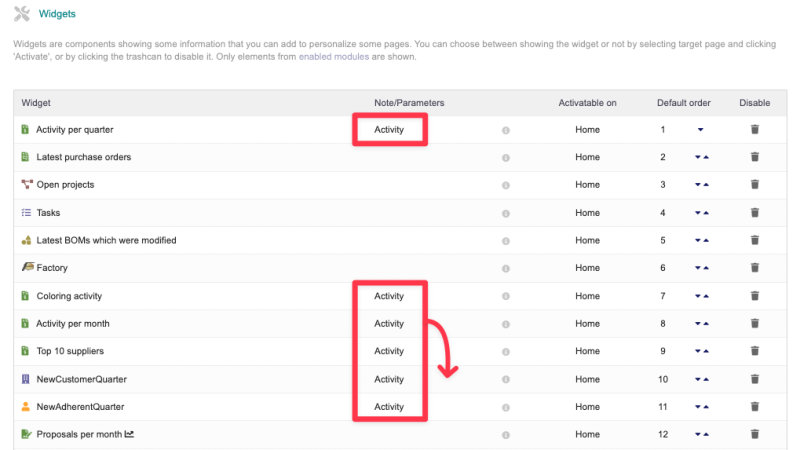
By default, widgets are assigned to the Dolibarr home page, but it is possible to move them to another page by deactivating them (with the trash can) then reactivating them by selecting the page where to display them.
List-Type Widgets
|
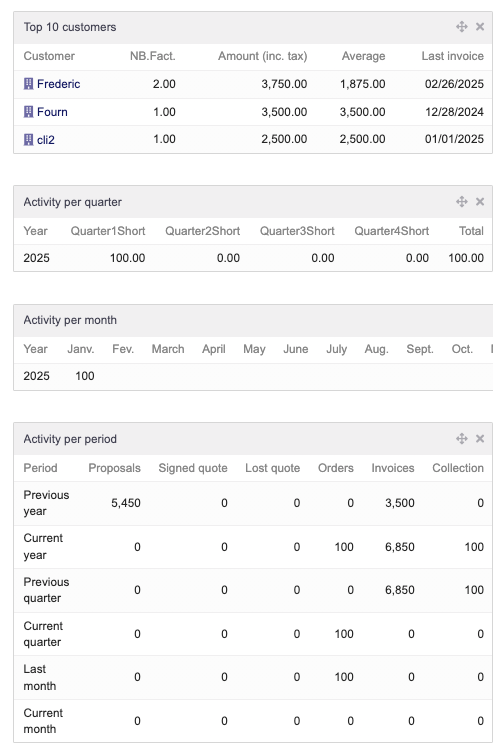
- Top 10 Customers: Displays the list of customers sorted by the amount of invoices they have received.
- Top 10 Suppliers: Displays the list of suppliers sorted by the amount they have received.
- Quarterly Billing: Displays invoices with one line per year and one column per quarter, as well as a total column
- Monthly Billing: Displays invoices with one line per year and one column per month, as well as a total column
- Activity by Quarter: Displays receipts with one row per year and one column per quarter, as well as a total column.
- Activity by Month: Displays receipts with one row per year and one column per month, as well as a total column.
- Activity by Period: Displays a table showing customer activity by displaying both the total amount (excluding or including tax) and the number of items.
- In columns: Customer Quotes, Signed Quotes, Lost Quotes, Customer Orders, Invoices, Collections.
- In rows: Previous Year, Current Year, Previous Quarter, Current Quarter, Previous Month, Current Month.
- Collection Activity: Displays a table of collections with
- In rows, the collection method (bank transfer, check, cash, etc.)
- In columns, a period (quarter, month, week, day before yesterday, yesterday and today)
|
|
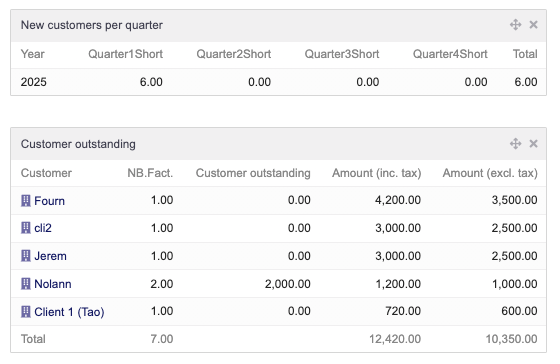
- New clients per quarter: Displays the number of new clients created each quarter
- New contacts per quarter: Displays the number of new contacts created each quarter
- New members per quarter: Displays the number of new members created each quarter
- Outstanding Customers: displays outstanding customer accounts with the authorized amount and the number and total of unpaid invoices
- Outstanding Supplier Accounts: displays outstanding customer accounts with the number and total of unpaid invoices
|
Graph-Type Widgets
This type of widget displays graphs by cumulative or non-cumulative number or quantity over a year.
You can access the graph settings by clicking on the funnel at the top right of the widget
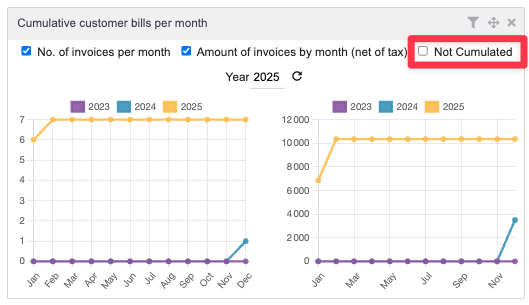
- Cumulative customer invoices per month
- Cumulative receipts per month


